What Is NexGen Inbound Dialer?
When a customer calls your business, the first few seconds matter. Whether they get connected quickly or wait in silence determines how they feel about your company from the start. NexGen Inbound Dialer is built to ensure every call is handled the right way, every time.
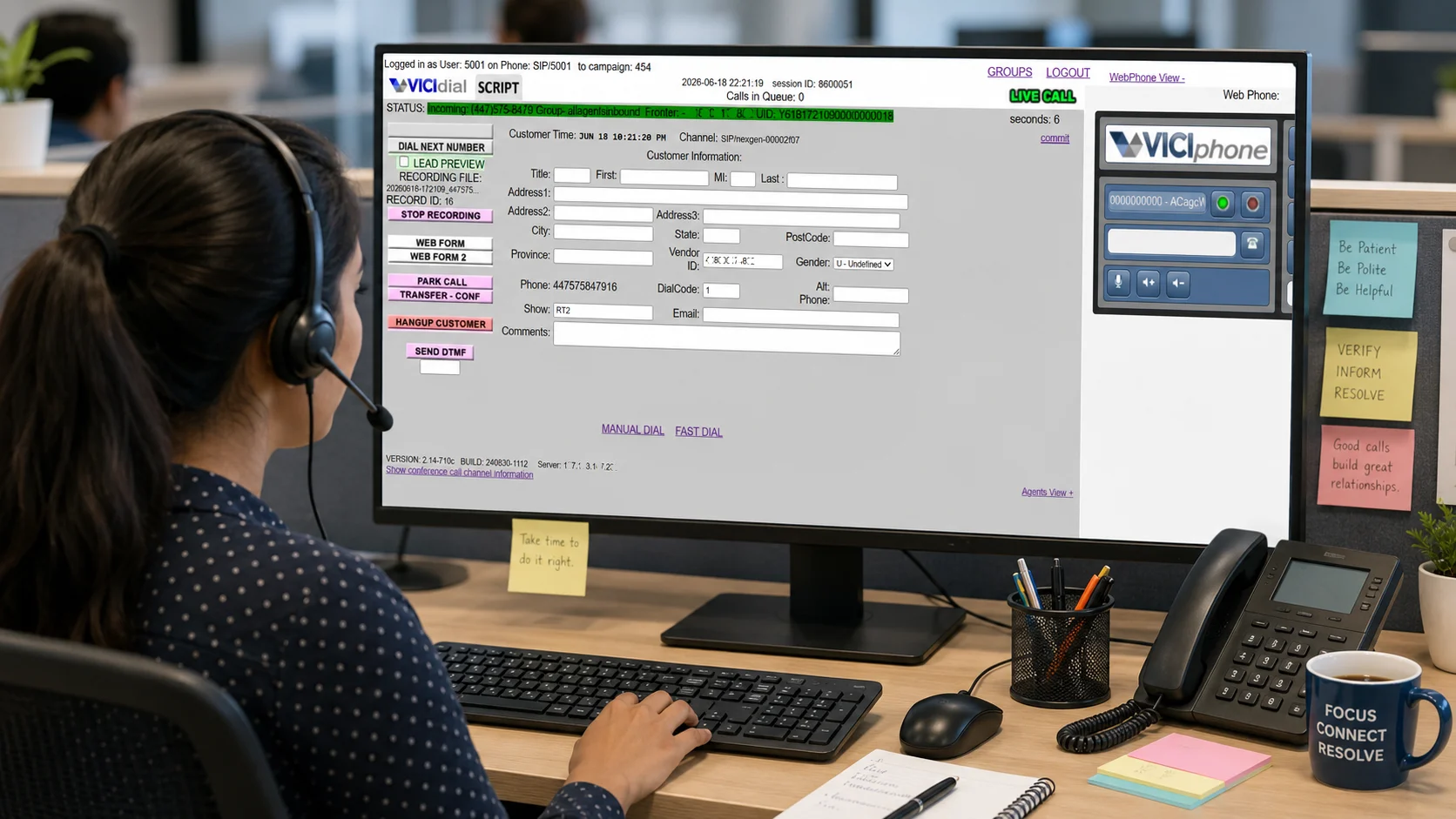
NexGen Inbound Dialer is a smart call routing system powered by VICIdial one of the most trusted open-source call center platforms in the world. It manages every aspect of an incoming call automatically, from the moment a customer dials your number to the moment an agent picks up and starts the conversation.
The system is designed for businesses that cannot afford to miss calls whether you run a sales team, a customer support center, or a multi-department operation. NexGen provides USA local numbers, UK local numbers, and toll-free numbers (TFN), all connected to a fully managed inbound call infrastructure.
-
Admin-Controlled SetupAdmins configure DID numbers, campaigns, and routing rules from a central dashboard.
-
VICIdial-PoweredBuilt on the industry-trusted VICIdial platform for reliable, enterprise-grade call handling.
-
Flexible Number OptionsUSA local, UK local, and toll-free numbers available for your inbound setup.
-
Real-Time MonitoringLive dashboards for admins to track call queues, agent performance, and call volume.
-
Smart IVR RoutingCalls route automatically to the right team based on department, availability, or business hours.
-
Scalable for GrowthAdd more agents, campaigns, and DID numbers as your business expands no infrastructure overhaul needed.
How NexGen Inbound Dialer Works
NexGen Inbound Dialer operates through a structured, end-to-end workflow that keeps every incoming call organized and every customer connected to the right team. Here is exactly how the process works from start to finish.
Everything begins on the admin side, where the NexGen technical team configures the complete inbound call setup inside the VICIdial system.
- Carrier Setup – Connects the dialer with the phone provider
- DID Number Setup – Adds the business number customers will call
- Campaign Setup – Assigns calls to a campaign or department
- Inbound Group Setup – Creates queues for routing calls to agents
Once configured, the system automatically routes incoming calls to the correct campaign, IVR menu, or agent group.
On the agent side, the process begins with opening the VICIdial agent portal. The agent navigates to the VICIdial Agent URL provided by the NexGen technical team and opens it in their web browser.
The agent enters their Phone Login and Phone Password as provided by the NexGen technical team, then clicks the Submit button to proceed.
After the first login, the Campaign Login screen appears automatically. The agent enters their User Login and User Password again, then selects their assigned campaign from the dropdown menu and clicks Submit.
- Enter User Login and User Password
- Select the assigned Campaign from the dropdown
- Click Submit to proceed to the agent dashboard
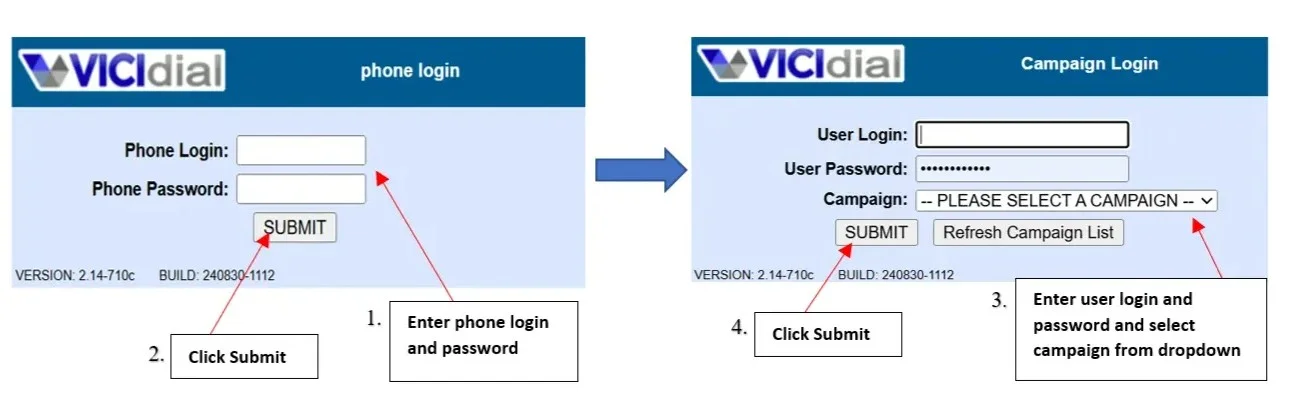
Credentials are issued by the NexGen technical team during onboarding. Keep them secure and do not share your login details with others.
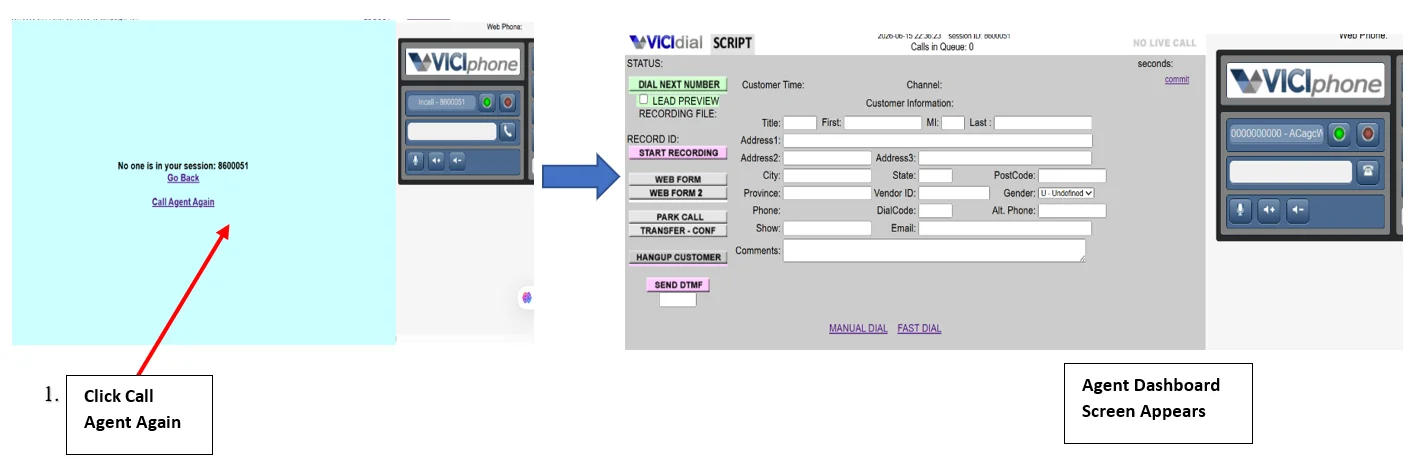
After submitting, the main agent dashboard screen appears. Within 5–6 seconds, if the screen shows "No one is in your session", the agent simply clicks "Call Agent Again" to reconnect.
Once connected, the agent becomes active in the assigned campaign and inbound group, ready to receive incoming calls.
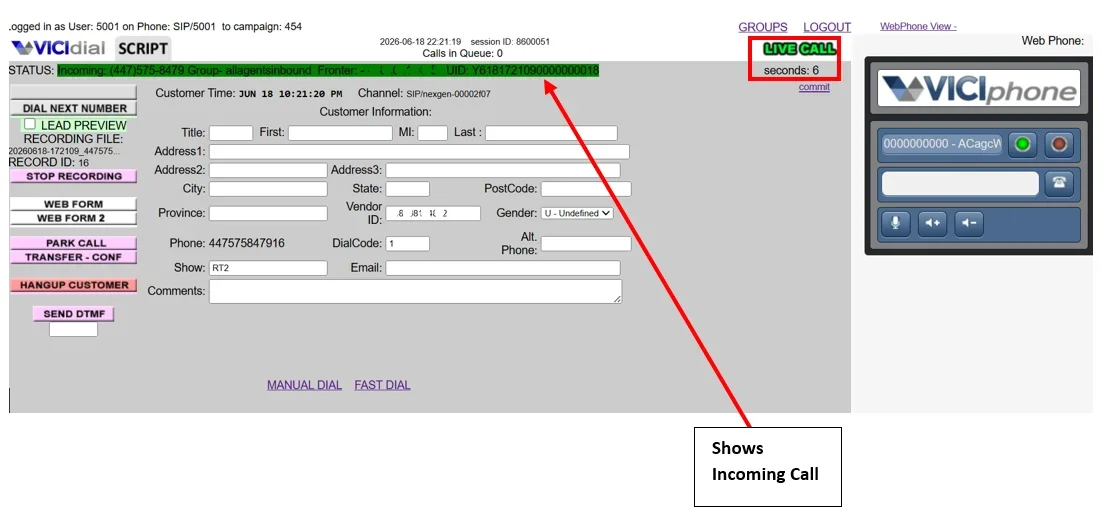
With agents ready, the inbound process begins. A customer dials the business number assigned by NexGen whether a USA local number, UK local number, or toll-free number. The call enters the NexGen inbound dialer system instantly and is processed by the routing engine.
NexGen automatically routes the incoming call to an available agent based on the routing rules set. The call appears directly on the agent's dashboard.
This reduces customer wait times and connects callers with the right team without unnecessary delays or transfers.
While agents handle calls, admins can monitor everything in real time through the NexGen dashboard. Live analytics include active calls, agent performance, missed calls, call duration, and queue status giving managers the visibility they need to optimize call operations and maintain service quality.
Key Features of NexGen Inbound Dialer
NexGen Inbound Dialer is more than a call routing tool. It is a complete inbound communication platform with features designed to handle real business scenarios.
Why NexGen Inbound Dialer Works for Your Business
Businesses that switch to NexGen Inbound Dialer consistently report improvements in call handling speed, agent efficiency, and customer satisfaction. Here is why the system delivers results.
Who Uses NexGen Inbound Dialer?
NexGen Inbound Dialer is built for businesses where incoming calls are a core part of daily operations. Here are the most common use cases.
- Route inbound leads instantly to sales agents
- Track call volume and conversion rates
- Run dedicated campaigns per product or region
- Route support calls to correct department
- Manage high volumes without dropped calls
- Record calls for training and quality review
- Handle property and investment inquiries
- Connect callers to the right advisor instantly
- Prioritize high-value inbound leads
- Route technical calls to specialist teams
- Monitor agent performance in real time
- Scale up quickly during peak support periods
Ready to Set Up Your Inbound Call System?
NexGen handles everything DID number setup, IVR configuration, campaign routing, and agent onboarding. Get your inbound dialer running in days, not weeks.
Frequently Asked Questions
-
A DID (Direct Inward Dialing) number is a virtual phone number assigned to your business through NexGen. It can be a USA local number, UK local number, or toll-free number (TFN). The admin maps this number to the appropriate campaign, IVR, or agent group so that all incoming calls route correctly from the moment a customer dials.
-
The agent opens the VICIdial Agent URL in their browser, enters their Phone Login and Phone Password on the first screen and clicks Submit, then on the Campaign Login screen enters their User Login and Password, selects the assigned campaign, and clicks Submit again to access the agent dashboard.
-
This message appears after the campaign login while the system is establishing the agent's session. The agent simply clicks the "Call Agent Again" button on that screen to reconnect. Within a few seconds, the agent dashboard becomes fully active and the agent is ready to receive calls.
-
Yes. The NexGen admin dashboard provides real-time monitoring of all call activity including active calls, agent performance, missed calls, call duration, and queue status. Managers can watch everything live and use detailed reports to optimize team operations and improve service quality over time.
-
NexGen supports routing based on department selection, agent availability, business hours, and priority levels. Calls can be directed to specific campaigns, IVR menus, agent groups, or individual departments such as sales, support, or billing giving admins full control over how every call is handled.
-
NexGen provides USA local numbers, UK local numbers, and toll-free numbers (TFN) for inbound call setup. These are configured by the admin in the system and mapped to the appropriate campaign or department during initial setup.
Final Thoughts
NexGen Inbound Dialer takes the complexity out of managing incoming business calls. From the moment an admin sets up a DID number to the moment a customer is connected with the right agent, every step is handled by a structured, reliable system built on VICIdial.
Whether you are running a small sales team, a growing support center, or a multi-department operation across the USA and UK, NexGen gives you the infrastructure to handle calls professionally with real-time monitoring, smart routing, and a clean agent experience that gets teams productive quickly.
If your business depends on inbound calls, getting the setup right matters. Explore NexGen Inbound Dialer to learn more, or contact our team to get started with a configuration that fits your exact needs.
Related Articles
Continue learning about call center and VoIP solutions